Helping teens build better saving habit
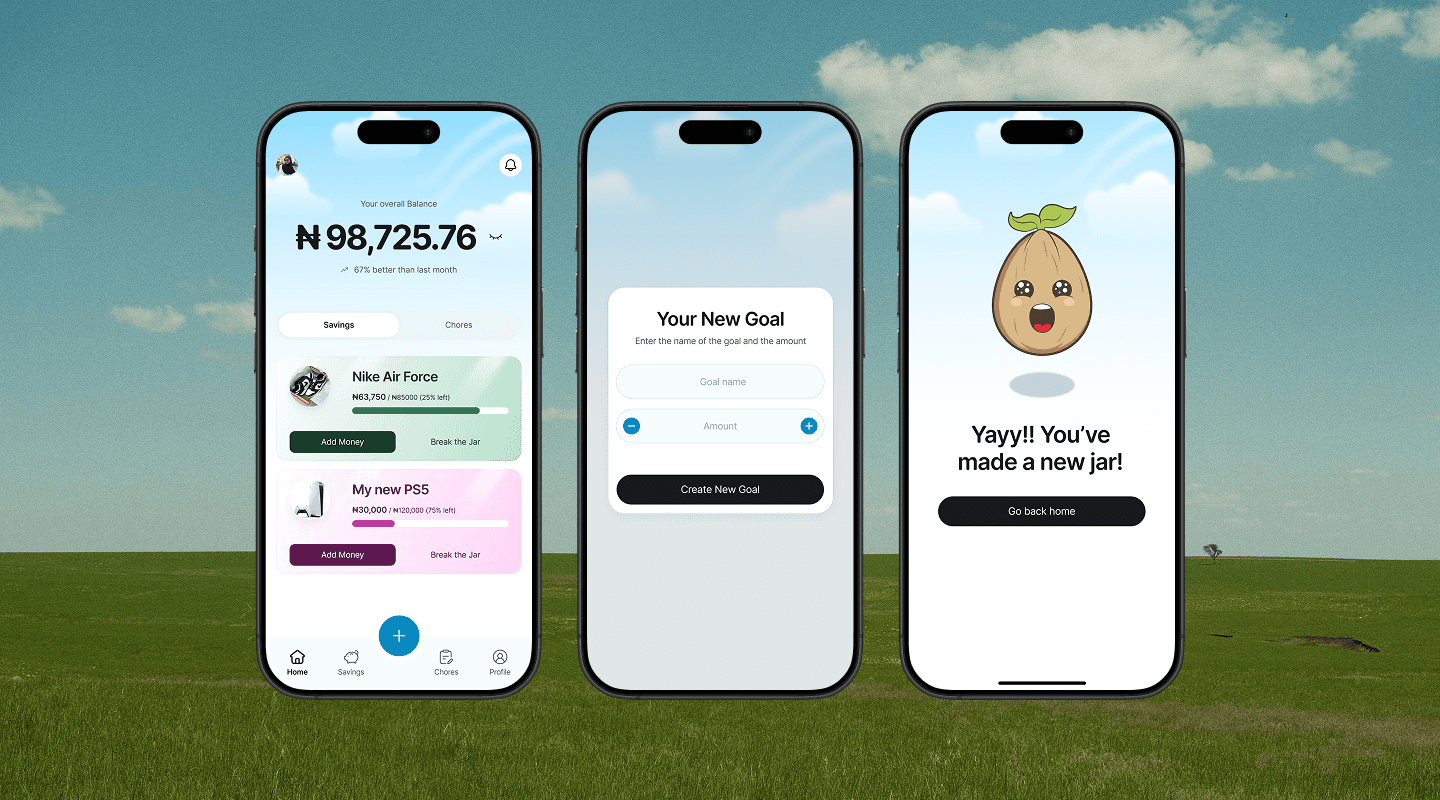
Sprout is a mobile app that helps teenagers set personal savings goals, track their progress through playful visuals, and build consistent saving habits that last.
Timeline
6 weeks
Tools Used
Figma
Maze
Notion
Industry
Fintech
Project Scope
User Research
Mobile App Design
Prototyping
Usability Test
The Challenge
Teens have the motivation to save but lack the structure and moment-to-moment support to resist spending. Existing tools are built for adults — they don't account for how teenagers actually experience money, make decisions, or stay engaged.
Users lose progress when:
Unexpected costs (social plans, impulse buys) drain savings without warning
Social and environmental triggers (stores, friends, snacks) compete directly with their goals
Research & Discovery
I conducted structured interviews with 4 teenagers aged 13–16 to understand how they currently manage money, what makes saving difficult, and what kind of tool might actually fit into their lives. All participants received regular income — through allowances, birthday money, or in one case a small side hustle — and had all previously saved up for something meaningful.
Key friction points — in participants' own words:
"I go out with friends a lot, so I tend to spend more than I budgeted for."
"Sometimes things I didn't expect come up and I have to take out of my savings."
"There are so many things to spend money on."
"Seeing stuff in stores that I want…increases my need to impulsively spend money."
All 4 participants had saved up for something meaningful before — the desire and capability exist. But without the right structure, good intentions collapse under daily spending pressure.
Competitive Analysis
I analysed three existing products in the children and teen financial space — BusyKid, Greenlight, and Till — to understand what was already on the market, what real users were saying, where gaps existed, and where Sprout could offer something meaningfully different.
Name
Strengths
Weaknesses
Opportunity
Busy Kid
Allows parents to set chores and rewards which is automatically added to the kid’s account when the task is completed
Kids can also donate a portion of their allowance to charity
A percentage of their allowance can be saved automatically
too many small fees or paywalls for individual features beyond the subscription price
inability to set a custom payday other than Friday
inability to change the allowance amount manually once it is set
provide transparent pricing
improve customisability for parents and kids
Greenlight
Kids get their own debit card
A convenient way to track kids and teens money habits
Intuitive and easy-to-use direct deposit feature
Learning feature to teach them about better money habits
No way to see order status for the debit card in the app
Blank screens during important tasks (not quite a crash, but functionally useless)
Clear progress tracking showing what's been completed
Dashboard showing order status, account setup progress, etc.
Provide offline mode where users can at least view recent transaction history
Till
It allows you to assign and track chores and link them to rewards, which can be used to earn money.
You can upgrade your child's account to a prepaid card for real-world transactions.
Difficult for others to send the kid money through the app due to too many questions and steps
Transaction logs often come late e.g a week later
Streamline transaction flow to be fast and seamless while also maintaining safety and financial compliance
Immediate confirmation emails, in-app, and pop-up notifications for every action
Information Architecture & User Flows
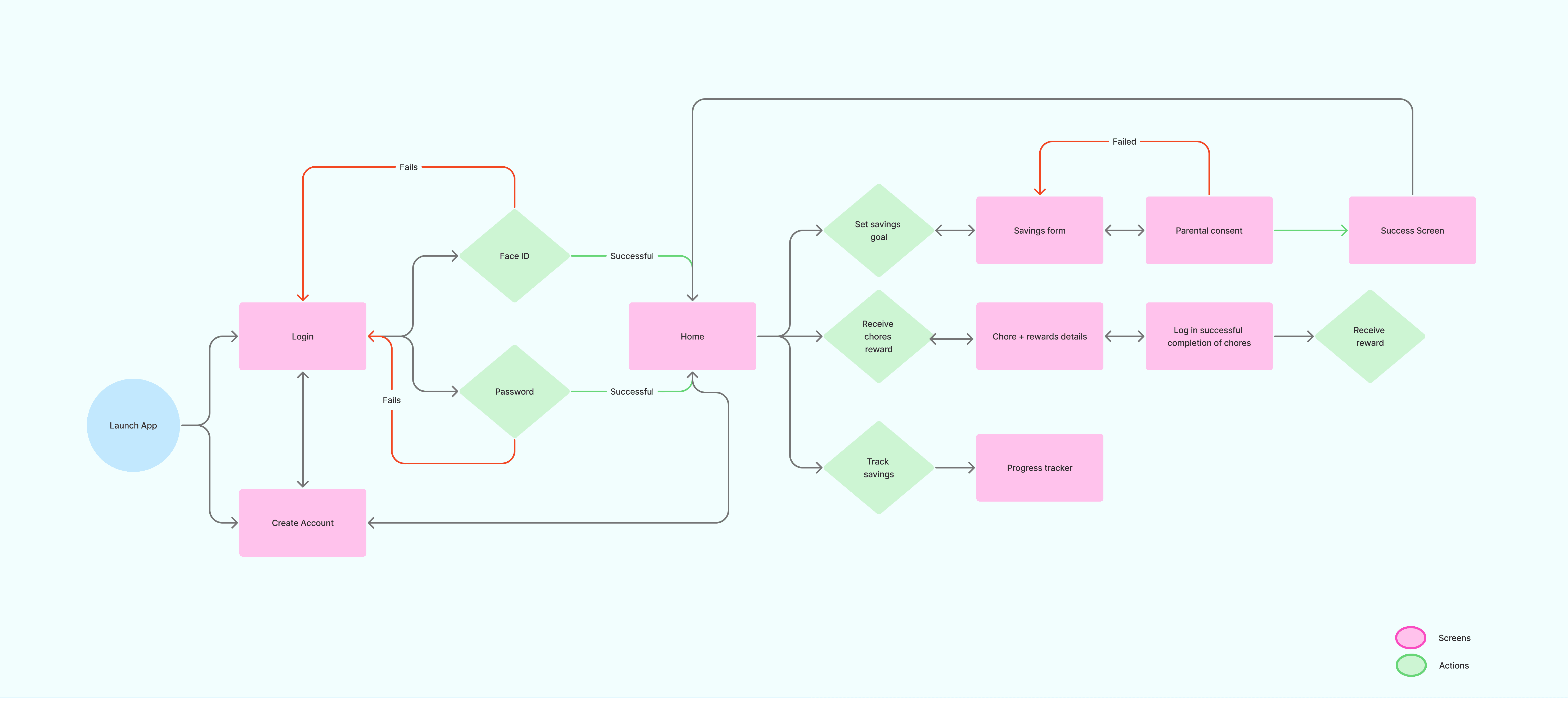
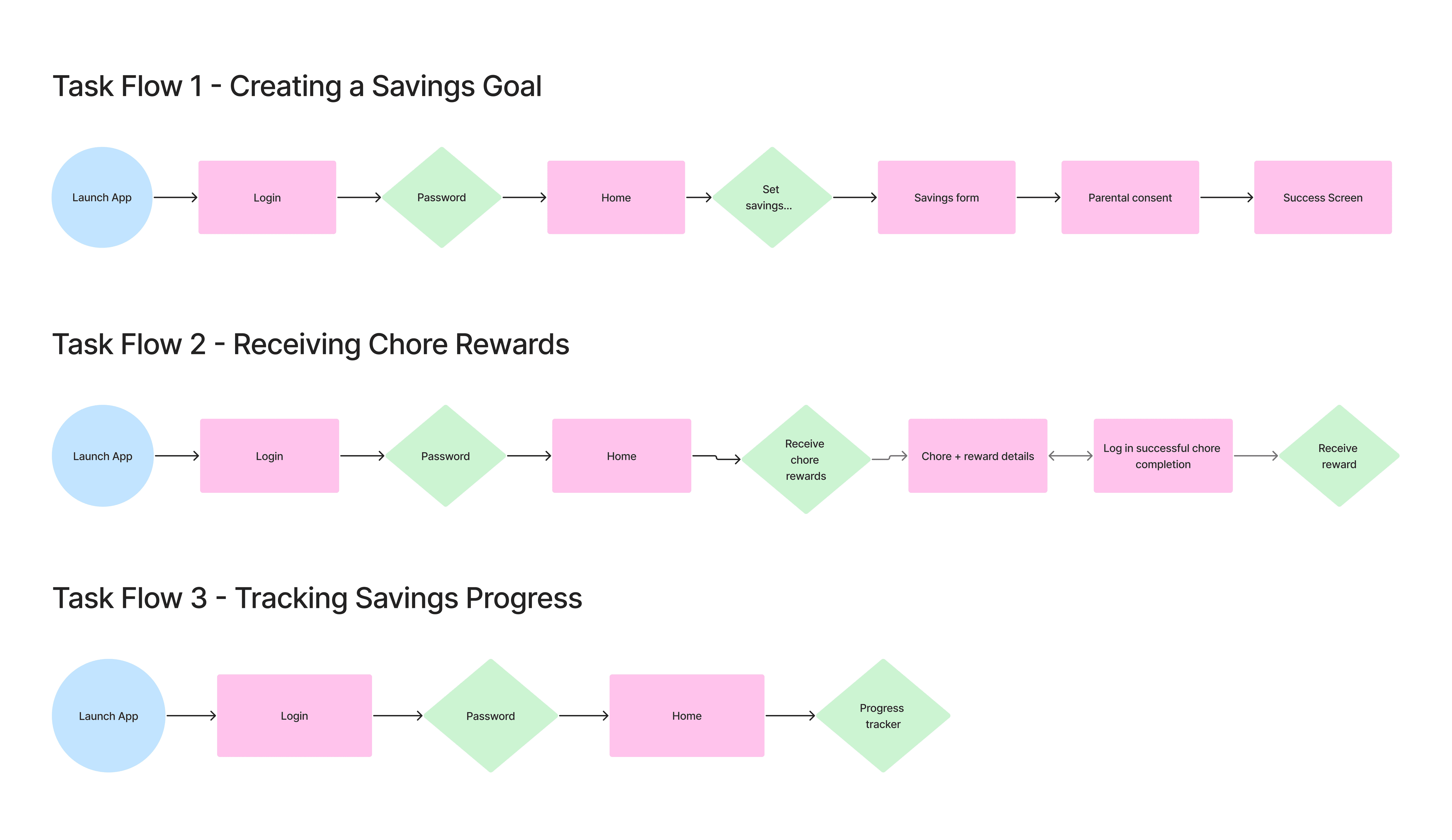
I mapped out Sprout's information architecture and three core task flows — ensuring the navigation was simple enough for a teenage user to complete key actions seamlessly.
The IA centred around three key actions from the home screen:
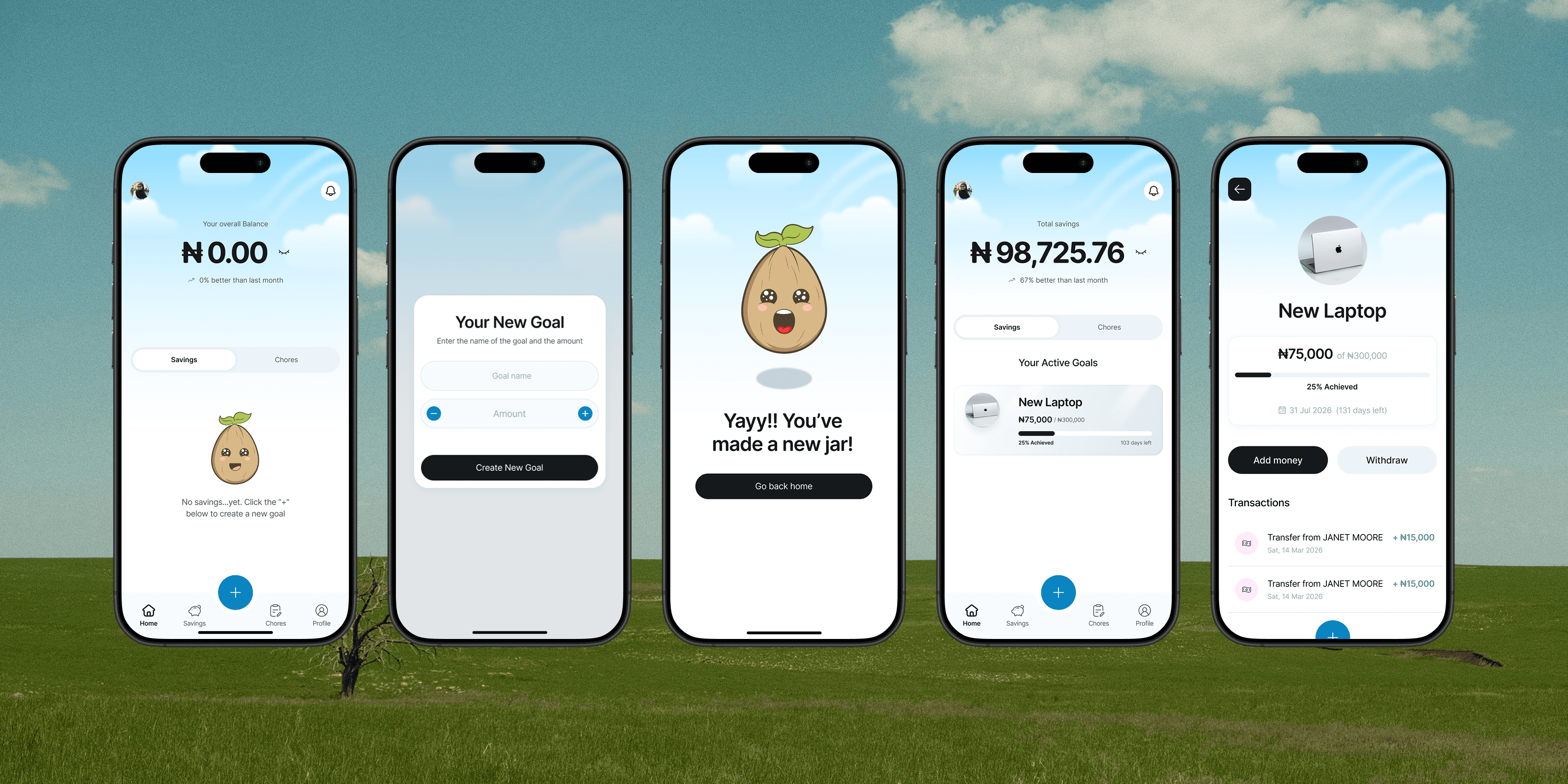
Create a savings goal
Track savings progress
Receive rewards from chores.Sprout app user flow
Wireframes
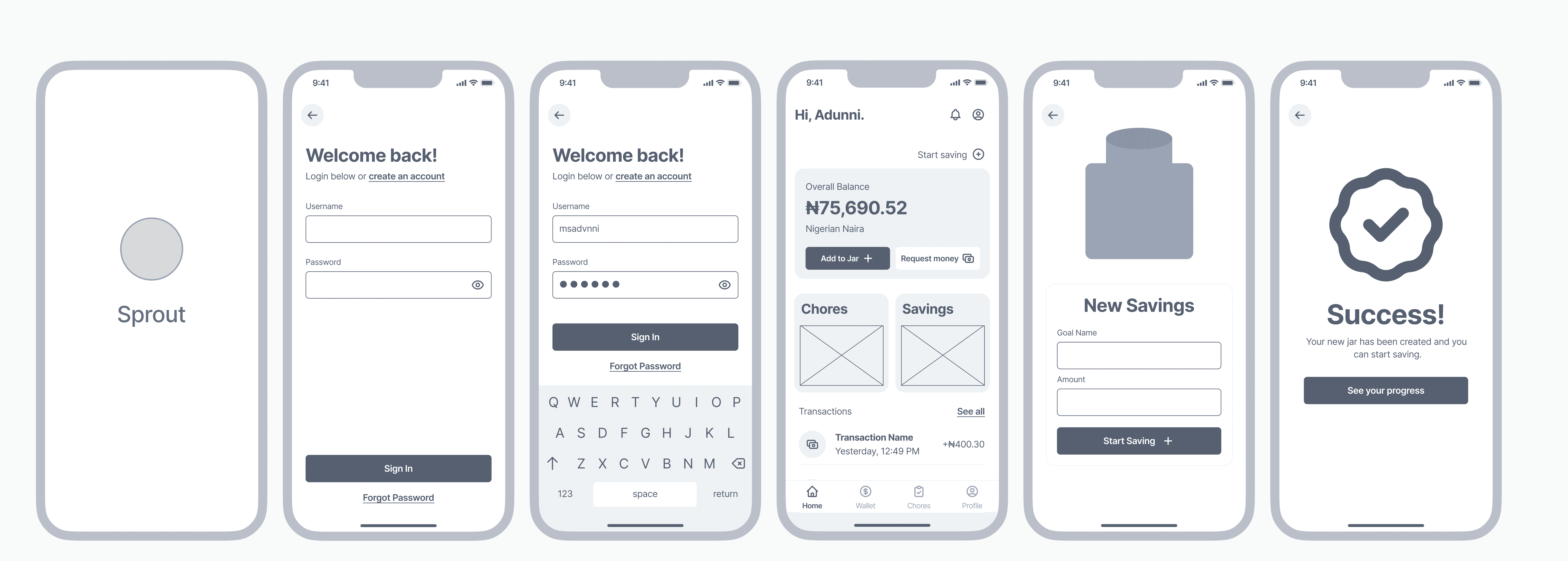
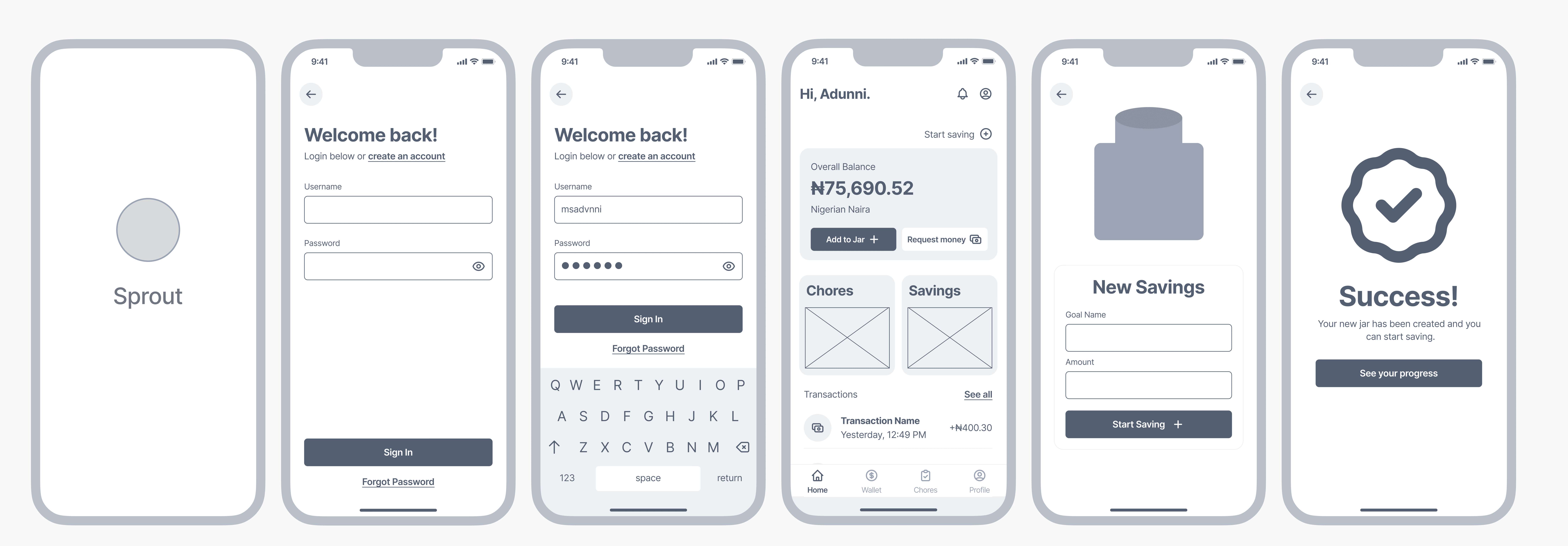
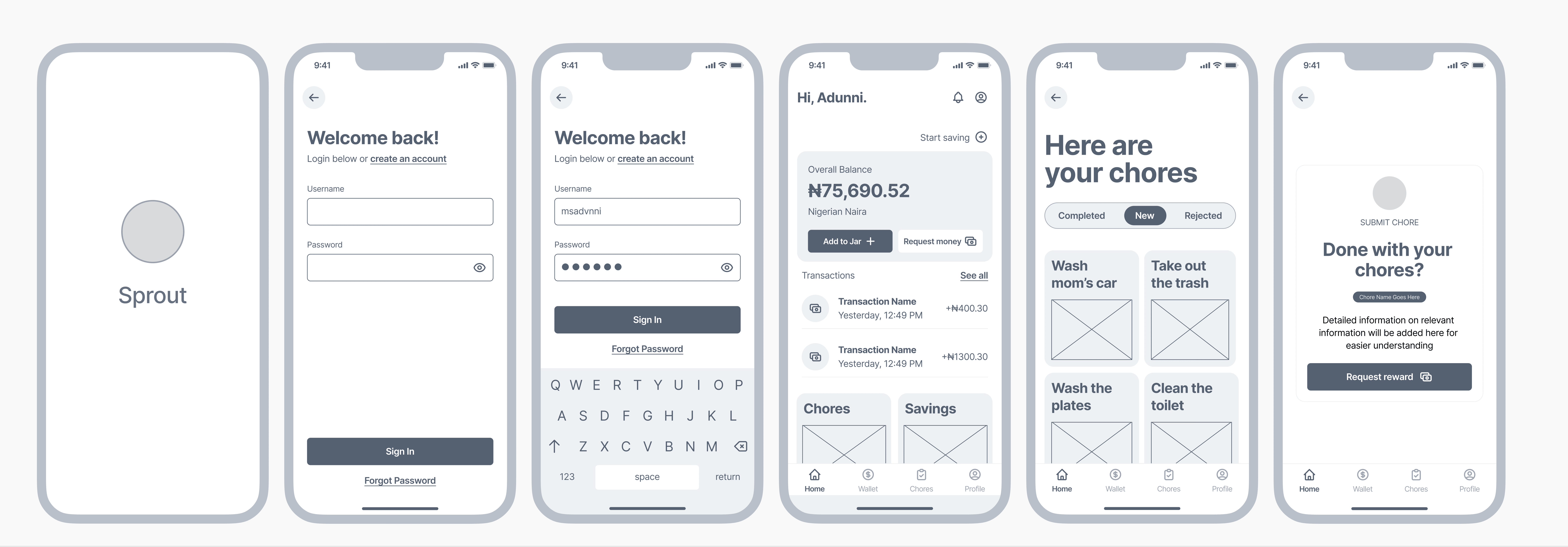
The goal at this stage was to validate structure and navigation logic before investing in visual design — making it fast and low-risk to identify problems. I wireframed each of the three core task flows in full, screen by screen, ensuring that every step a user needed to take was accounted for and as short as possible.
Meet Sprout!
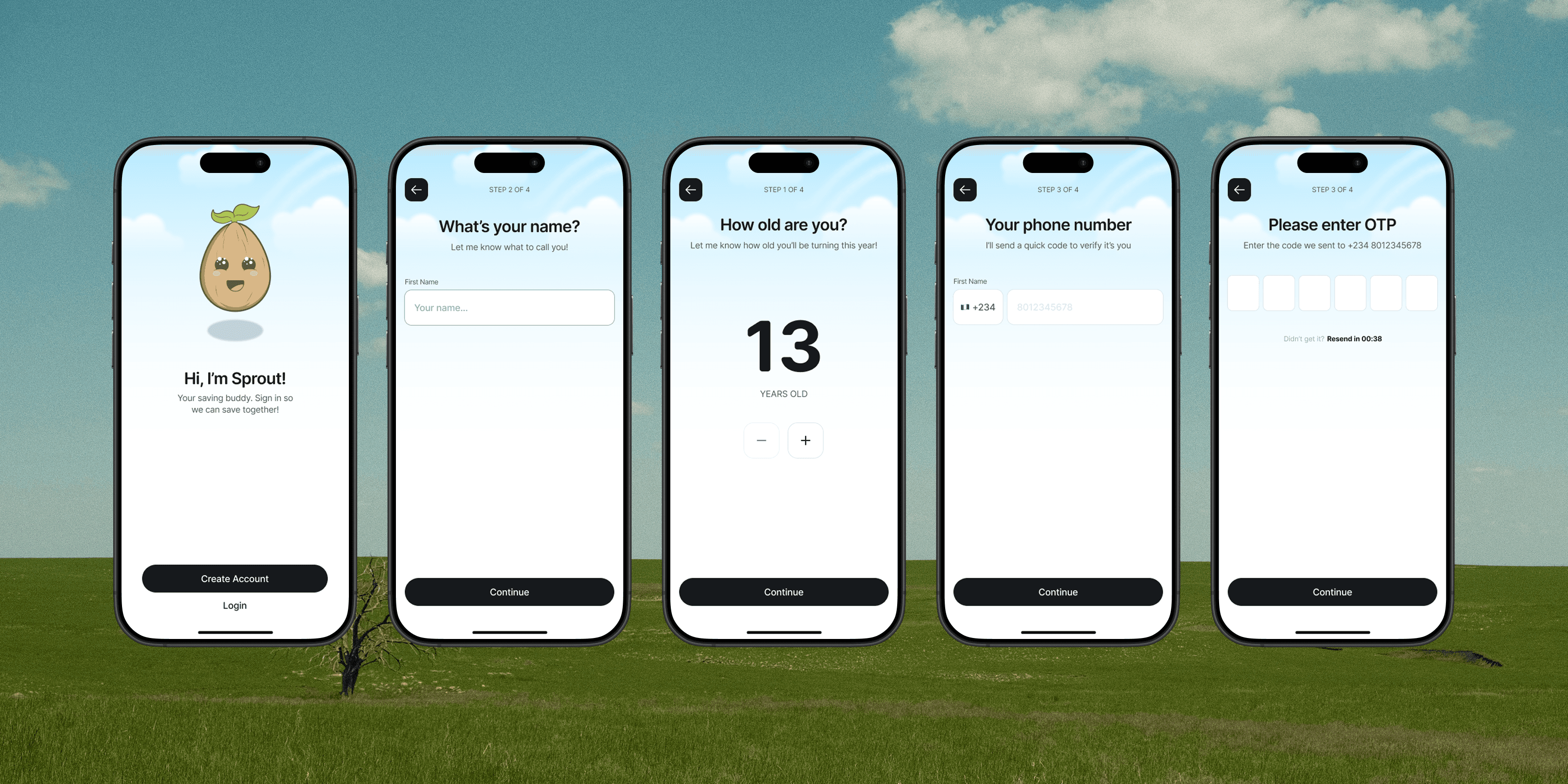
One of the central design challenges with Sprout was making saving feel emotionally rewarding, and not like a chore. Numbers and progress bars communicate information, but they don't create feeling.
I designed a mascot character, also named Sprout, to serve as a buddy for the teen on their savings journey: a companion that celebrates wins, shares in the effort, and gently signals when things aren't going to plan.





Making the mascot a seedling was based on the earlier user research. When asked to visualise their savings, all 4 participants chose growth metaphors: a filling jar or a growing tree. A seed is the beginning of that growth — it's the perfect visual metaphor for a teenager who is just starting their savings journey.
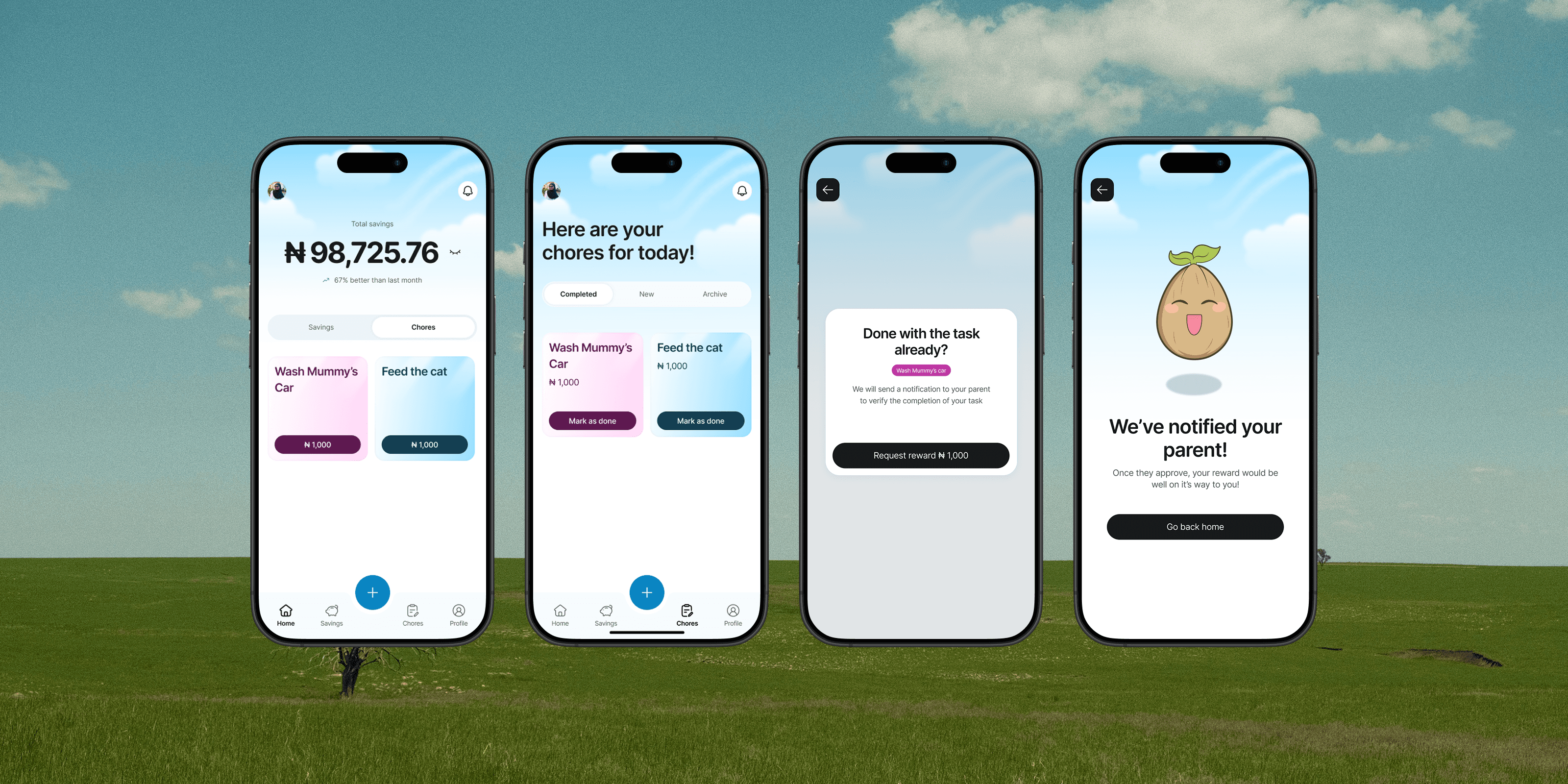
Mobile App Designs
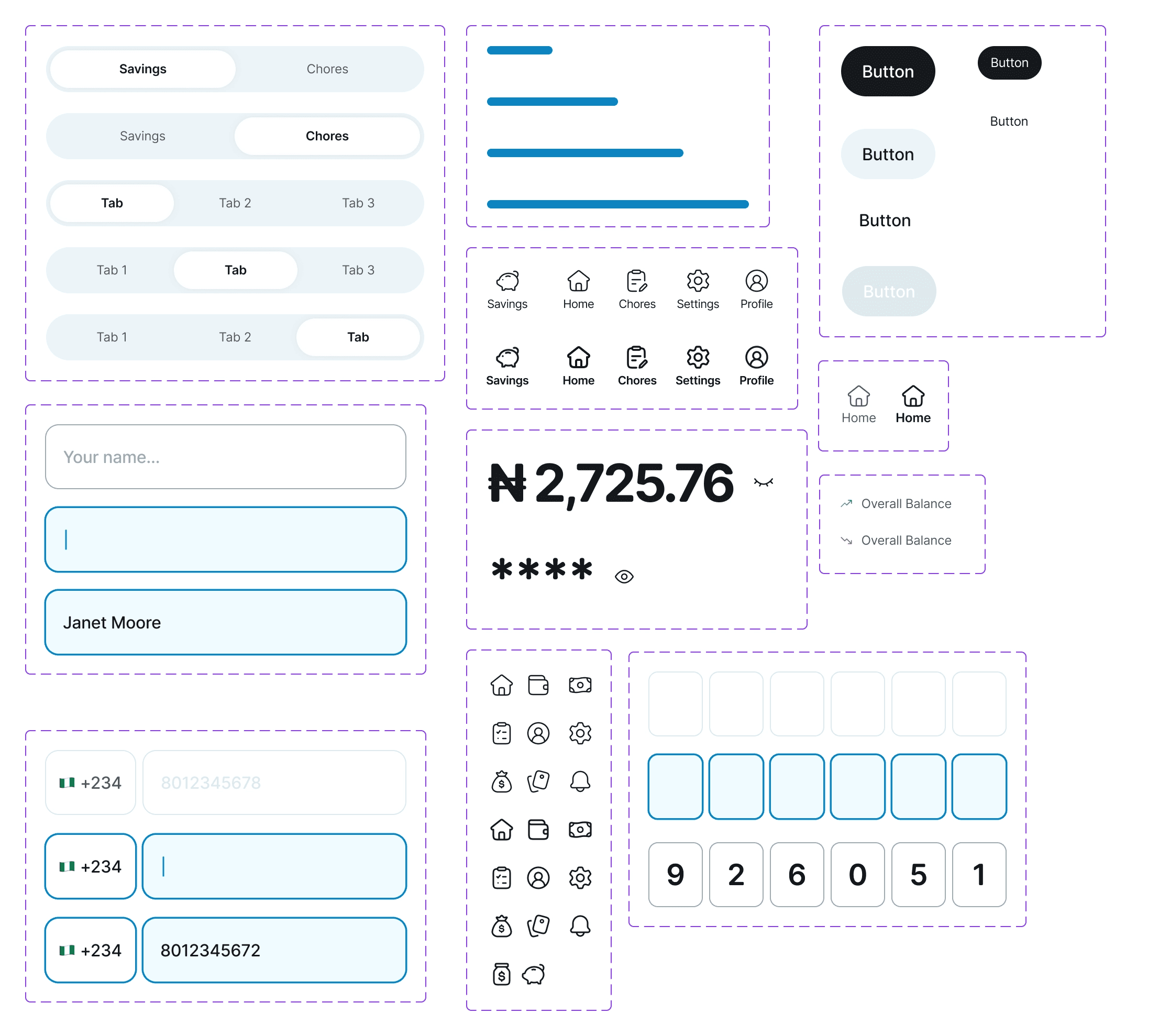
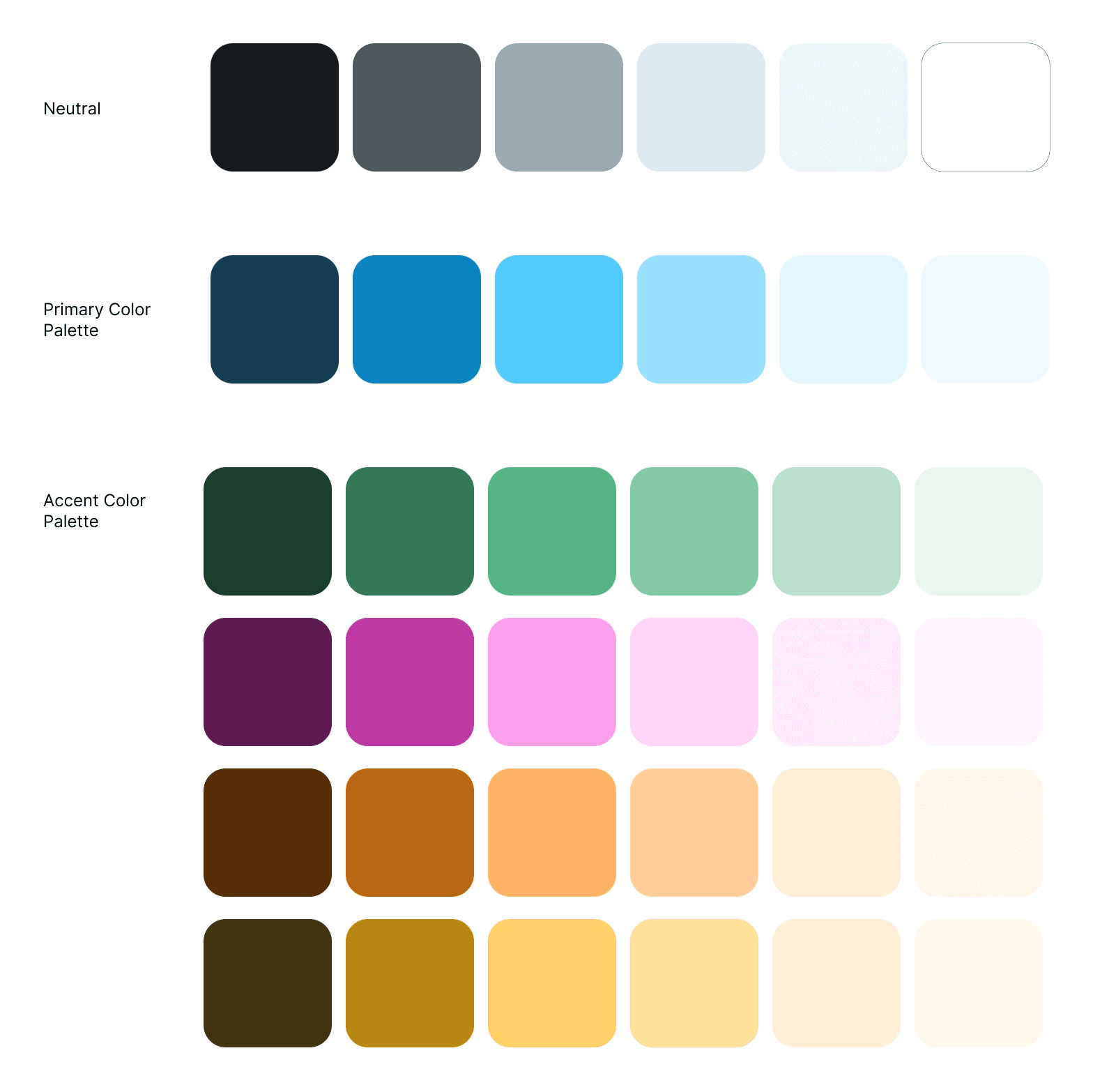
Style Guide & Components

Prototyping & Usability Testing
I built an interactive prototype to test the key features for the Sprout. To validate usability of the Sprout app, I ran prototype tests focused on the key task flows with 3 participants that participated in the initial user research.
Metrics tracked
Task success rate (completed without help)
Overall User satisfaction score = 92.59%
100%
Onboarding success rate
100%
Creating a savings goal success rate
66.7%
Tracking savings progress success rate
83.3%
Receiving chore rewards success rate
Learnings & Key Takeaways
Design is rarely linear in practice
Through out the process of building Sprout, I found myself going back and forth between research, design, and testing. I learnt how to better navigate the ambiguity and iterative process of designing a product.
Be one with the problem!
In order to better understand the problem and come up with better solutions for this project, I talked to a lot of high school students to get a better picture of their spending and saving habits.
Helping teens build better saving habit
Sprout is a mobile app that helps teenagers set personal savings goals, track their progress through playful visuals, and build consistent saving habits that last.
Timeline
6 weeks
Tools Used
Figma
Maze
Notion
Industry
Fintech
Project Scope
User Research
Mobile App Design
Prototyping
Usability Test
The Challenge
Teens have the motivation to save but lack the structure and moment-to-moment support to resist spending. Existing tools are built for adults — they don't account for how teenagers actually experience money, make decisions, or stay engaged.
Users lose progress when:
Unexpected costs (social plans, impulse buys) drain savings without warning
Social and environmental triggers (stores, friends, snacks) compete directly with their goals
Research & Discovery
I conducted structured interviews with 4 teenagers aged 13–16 to understand how they currently manage money, what makes saving difficult, and what kind of tool might actually fit into their lives. All participants received regular income — through allowances, birthday money, or in one case a small side hustle — and had all previously saved up for something meaningful.
Key friction points — in participants' own words:
"I go out with friends a lot, so I tend to spend more than I budgeted for."
"There are so many things to spend money on."
"Sometimes things I didn't expect come up and I have to take out of my savings."
"Seeing stuff in stores that I want…increases my need to impulsively spend money."
All 4 participants had saved up for something meaningful before — the desire and capability exist. But without the right structure, good intentions collapse under daily spending pressure.
Competitive Analysis
I analysed three existing products in the children and teen financial space — BusyKid, Greenlight, and Till — to understand what was already on the market, what real users were saying, where gaps existed, and where Sprout could offer something meaningfully different.
Name
Strengths
Weaknesses
Opportunity
Busy Kid
Allows parents to set chores and rewards which is automatically added to the kid’s account when the task is completed
Kids can also donate a portion of their allowance to charity
A percentage of their allowance can be saved automatically
too many small fees or paywalls for individual features beyond the subscription price
inability to set a custom payday other than Friday
inability to change the allowance amount manually once it is set
provide transparent pricing
improve customisability for parents and kids
Greenlight
Kids get their own debit card
A convenient way to track kids and teens money habits
Intuitive and easy-to-use direct deposit feature
Learning feature to teach them about better money habits
No way to see order status for the debit card in the app
Blank screens during important tasks (not quite a crash, but functionally useless)
Clear progress tracking showing what's been completed
Dashboard showing order status, account setup progress, etc.
Provide offline mode where users can at least view recent transaction history
Till
It allows you to assign and track chores and link them to rewards, which can be used to earn money.
You can upgrade your child's account to a prepaid card for real-world transactions.
Difficult for others to send the kid money through the app due to too many questions and steps
Transaction logs often come late e.g a week later
Streamline transaction flow to be fast and seamless while also maintaining safety and financial compliance
Immediate confirmation emails, in-app, and pop-up notifications for every action
Information Architecture & User Flows
I mapped out Sprout's information architecture and three core task flows — ensuring the navigation was simple enough for a teenage user to complete key actions seamlessly.
The IA centred around three key actions from the home screen:
Create a savings goal
Track savings progress
Receive rewards from chores.Sprout app user flow
Wireframes
The goal at this stage was to validate structure and navigation logic before investing in visual design — making it fast and low-risk to identify problems. I wireframed each of the three core task flows in full, screen by screen, ensuring that every step a user needed to take was accounted for and as short as possible.
Meet Sprout!
One of the central design challenges with Sprout was making saving feel emotionally rewarding, and not like a chore. Numbers and progress bars communicate information, but they don't create feeling.
I designed a mascot character, also named Sprout, to serve as a buddy for the teen on their savings journey: a companion that celebrates wins, shares in the effort, and gently signals when things aren't going to plan.
Making the mascot a seedling was based on the earlier user research. When asked to visualise their savings, all 4 participants chose growth metaphors: a filling jar or a growing tree. A seed is the beginning of that growth — it's the perfect visual metaphor for a teenager who is just starting their savings journey.
Mobile App Designs
Style Guide & Components
Prototyping & Usability Testing
I built an interactive prototype to test the key features for the Sprout. To validate usability of the Sprout app, I ran prototype tests focused on the key task flows with 3 participants that participated in the initial user research.
Metrics tracked
Task success rate (completed without help)
Overall User satisfaction score = 92.59%
100%
Onboarding success rate
100%
Creating a savings goal success rate
66.7%
Tracking savings progress success rate
83.3%
Receiving chore rewards success rate
Learnings & Key Takeaways
Design is rarely linear in practice
Through out the process of building Sprout, I found myself going back and forth between research, design, and testing. I learnt how to better navigate the ambiguity and iterative process of designing a product.
Be one with the problem!
In order to better understand the problem and come up with better solutions for this project, I talked to a lot of high school students to get a better picture of their spending and saving habits.
Helping teens build better saving habit
Sprout is a mobile app that helps teenagers set personal savings goals, track their progress through playful visuals, and build consistent saving habits that last.
Timeline
6 weeks
Industry
Fintech
Tools Used
Figma
Maze
Notion
Project Scope
User Research
Mobile App Design
Prototyping
Usability Test
The Challenge
Teens have the motivation to save but lack the structure and moment-to-moment support to resist spending. Existing tools are built for adults — they don't account for how teenagers actually experience money, make decisions, or stay engaged.
Users lose progress when:
Unexpected costs (social plans, impulse buys) drain savings without warning
Social and environmental triggers (stores, friends, snacks) compete directly with their goals
Research & Discovery
I conducted structured interviews with 4 teenagers aged 13–16 to understand how they currently manage money, what makes saving difficult, and what kind of tool might actually fit into their lives. All participants received regular income — through allowances, birthday money, or in one case a small side hustle — and had all previously saved up for something meaningful.
Key friction points — in participants' own words:
"I go out with friends a lot, so I tend to spend more than I budgeted for."
"There are so many things to spend money on."
"Sometimes things I didn't expect come up and I have to take out of my savings."
"Seeing stuff in stores that I want…increases my need to impulsively spend money."
All 4 participants had saved up for something meaningful before — the desire and capability exist. But without the right structure, good intentions collapse under daily spending pressure.
Competitive Analysis
I analysed three existing products in the children and teen financial space — BusyKid, Greenlight, and Till — to understand what was already on the market, what real users were saying, where gaps existed, and where Sprout could offer something meaningfully different.
Name
Strengths
Weaknesses
Opportunity
Busy Kid
STRENGTHS
Allows parents to set chores and rewards which is automatically added to the kid’s account when the task is completed
Kids can also donate a portion of their allowance to charity
A percentage of their allowance can be saved automatically
WEAKNESSES
too many small fees or paywalls for individual features beyond the subscription price
inability to set a custom payday other than Friday
inability to change the allowance amount manually once it is set
OPPORTUNITY
provide transparent pricing
improve customisability for parents and kids
Greenlight
STRENGTHS
Kids get their own debit card
A convenient way to track kids and teens money habits
Intuitive and easy-to-use direct deposit feature
Learning feature to teach them about better money habits
WEAKNESSES
No way to see order status for the debit card in the app
Blank screens during important tasks (not quite a crash, but functionally useless)
OPPORTUNITY
Clear progress tracking showing what's been completed
Dashboard showing order status, account setup progress, etc.
Provide offline mode where users can at least view recent transaction history
Till
STRENGTHS
It allows you to assign and track chores and link them to rewards, which can be used to earn money.
You can upgrade your child's account to a prepaid card for real-world transactions.
WEAKNESSES
Difficult for others to send the kid money through the app due to too many questions and steps
Transaction logs often come late e.g a week later
OPPORTUNITY
Streamline transaction flow to be fast and seamless while also maintaining safety and financial compliance
Immediate confirmation emails, in-app, and pop-up notifications for every action
Information Architecture & User Flows
I mapped out Sprout's information architecture and three core task flows — ensuring the navigation was simple enough for a teenage user to complete key actions seamlessly.
The IA centred around three key actions from the home screen:
Create a savings goal
Track savings progress
Receive rewards from chores.Sprout app user flow
Wireframes
The goal at this stage was to validate structure and navigation logic before investing in visual design — making it fast and low-risk to identify problems. I wireframed each of the three core task flows in full, screen by screen, ensuring that every step a user needed to take was accounted for and as short as possible.
Meet Sprout!
One of the central design challenges with Sprout was making saving feel emotionally rewarding, and not like a chore. Numbers and progress bars communicate information, but they don't create feeling.
I designed a mascot character, also named Sprout, to serve as a buddy for the teen on their savings journey: a companion that celebrates wins, shares in the effort, and gently signals when things aren't going to plan.
Making the mascot a seedling was based on the earlier user research. When asked to visualise their savings, all 4 participants chose growth metaphors: a filling jar or a growing tree. A seed is the beginning of that growth — it's the perfect visual metaphor for a teenager who is just starting their savings journey.
Mobile App Designs
Style Guide & Components
Prototyping & Usability Testing
I built an interactive prototype to test the key features for the Sprout. To validate usability of the Sprout app, I ran prototype tests focused on the key task flows with 3 participants that participated in the initial user research.
Metrics tracked
Task success rate (completed without help)
Overall User satisfaction score = 92.59%
100%
Onboarding success rate
100%
Creating a savings goal success rate
66.7%
Tracking savings progress success rate
83.3%
Receiving chore rewards success rate
Learnings & Key Takeaways
Design is rarely linear in practice
Through out the process of building Sprout, I found myself going back and forth between research, design, and testing. I learnt how to better navigate the ambiguity and iterative process of designing a product.
Be one with the problem!
In order to better understand the problem and come up with better solutions for this project, I talked to a lot of high school students to get a better picture of their spending and saving habits.